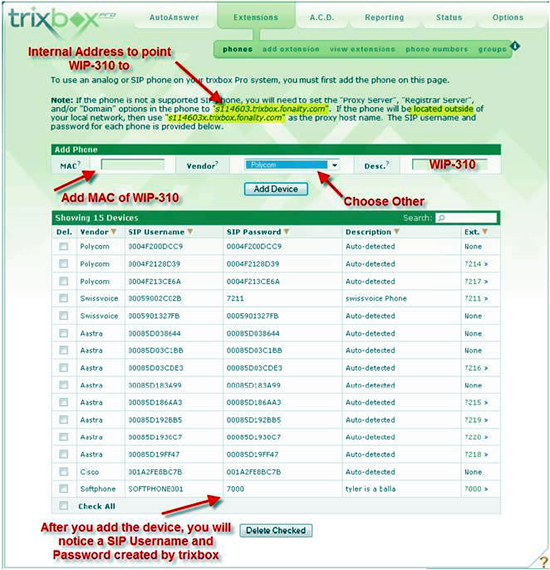
First add your WIP310 as a device (Other Device)
Trixbox will then assign a SIP Username and Password (noted after you have added the WIP310 as a device)
Also, in the paragraph above the “add a device a section”, you will notice a domain name address to point your WIP310 to. There are both a local and non-local domain name to use. You MUST use either of the two depending on if your WIP310 is local to the PBX or not. (See Figure 1 Below)
Next add your extension to the Trixbox PRO system (See Figure 2 Below)
Once completed, use the document below to complete your setup, making the following substitutions in the registration section (Step 18):
Proxy: sxxxxxxx.trixbox.fonality.com (from the paragraph in the device phones tab)
Outbound Proxy: sxxxxxxx.trixbox.fonality.com (from the paragraph in the device phones tab)
Display Name: (From device phone section)
User ID: (From device phone section)
Password: (From device phone section)
Save all changes. That should do it!
How To Use CloudSpan for PBX Licensing and Hosting CloudSpan is our brand-agnostic PBX licensing…
Most UC deals don't fall apart on the product. They fall apart in the gaps…
Today we're announcing the launch of CloudSpan. It's a brand-agnostic platform where VoIP Supply partners…
The Fanvil X7A is an enterprise Android IP phone built around a 7-inch color touchscreen…
Setting up a home office VoIP phone in 2026 — a step-by-step guide from the…
On the latest episode of SiP Chats, VoIP Supply's Brian Hyrek sat down with Michelle…