
VoIP Specialists available in High Definition 8:30am–6:30pm weekdays. — Toll Free: 1-800-398-8647
We Ship Internationally
Grandstream GXW4024
- SKU #
- 02-105079
- Manufacturer
- Grandstream
Detailed Description
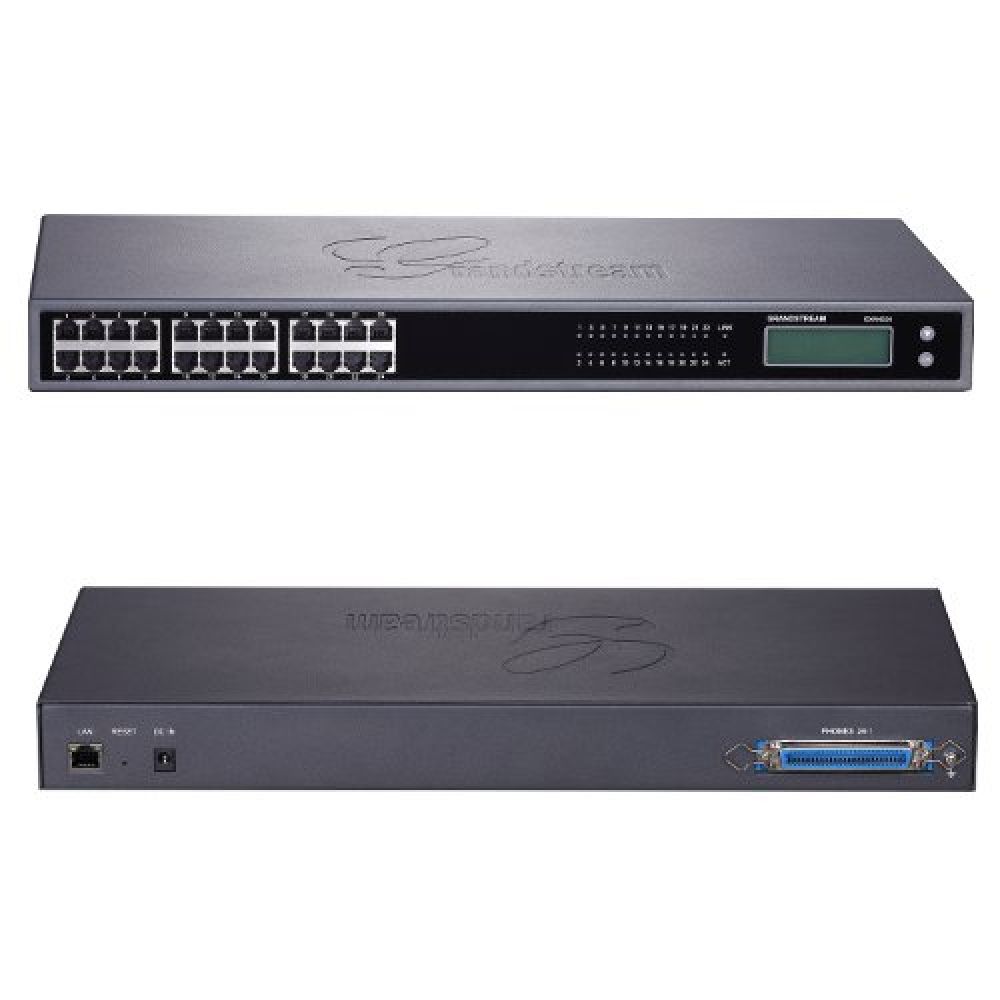
The Grandstream GXW4024 is a high density SIP based analog telephone VoIP gateway that is fully interoperable with leading IP-PBX and Softswitch systems. It features 24 telephone ports, superb voice quality, rich telephony functionalities, easy provisioning, flexible dialing plans and advanced security protection.
- 24 telephone FXS ports
- Up to 2 SIP server profiles per system
- 24 x RJ11 FXS
Grandstream GXW4024
The Grandstream GXW4024 is a high density SIP based analog telephone VoIP gateway that is fully interoperable with leading IP-PBX and Softswitch systems. It features 24 telephone ports, superb voice quality, rich telephony functionalities, easy provisioning, flexible dialing plans and advanced security protection. The GXW4024 gateway enables small and medium businesses to create a cost-effective hybrid IP and analog telephone systems and enjoys the benefits of VoIP communications while preserving investment on existing analog phones and traditional PBX systems.
Grandstream GXW4024 VoIP Gateway
The Grandstream GXW4024 is the ultimate low-cost and high performance gateway for hosted VoIP network or SMB migrating their legacy analog phones to IP infrastructure. It is an ideal IP enabler for SIP trunking analog phones, faxes, traditional PBXs or key systems and can create a powerful hybrid business phone system when combined with Grandstream’s new IP-PBX, the GXE502x series.
Grandstream GXW4024 Features and Functions
- 24 telephone FXS ports with both RJ11 and 50-pin Telco connector
- Up to 2 SIP server profiles per system and independent account per port
- Supported voice codecs include G.711, G.723, G.726, G.729 A/B/E, iLBC, T.38 Fax
- Carrier grade G.168 line echo cancellation
- Ideal IP enabler for analog phones, faxes, and legacy PBX systems
Grandstream GXW4024 Specifications
- Telephone Interfaces: 24 x RJ11 FXS ports and 1 x 50-pin Telco connector
- Network Interface: 1 x 10M/100Mbps auto-sensing RJ45 port
- LED Indicators: Power, Ready, LAN, Telephone Ports
- Voice-over-Packet Capabilities: G.168 carrier grade line echo cancellation, dynamic jitter buffer, modem detection and auto-switch to G.711
- Voice Compression: G.711, G.723, G.726 40/32/24/16, G.729A/B/E, iLBC
- Fax over IP: T.38 complaint Group 3 Fax Relay up to 14.4kpbs and auto-switch to G.711 for Fax Pass-through
- Telephony Features: Caller ID display or block, call waiting, blind or attended call transfer, call forward, do not disturb, 3-way conference, last call return, paging, message waiting indicator LED and stutter tone, auto dial
- QoS: DiffServ, TOS, 802.1P/Q VLAN tagging
- Network Protocols: TCP/UDP, RTP/RTCP, HTTP/HTTPS, ARP/RARP, ICMP, DNS, DHCP, NTP, TFTP, TELNET, PPPoE, STUN
- DTMF Method: Flexible DTMF transmission methods including In-Audio, RFC2833, and/or SIP INFO
- Signaling: SIP RFC 3261 over UDP/TCP
- SIP Server Profiles and Accounts Per System: Up to two2 distinct SIP server profiles per system and independent SIP account per telephone port
- Provisioning: TFTP, HTTP, HTTPS
- Security: SRTP, TLS/SIPS
- Management: Syslog, HTTPS, Web browser, TELNET, voice prompt, TR-069pending
- Universal Power Supply: Output: 12VDC - Input: 100-240VAC, 1.0A, 50/60
Didn’t find the VoIP gateway you were looking for?
Check out these other Grandstream VoIP phones:
Technical Specifications
- Analog Gateway
- 24 Port
Customer Reviews
Others’ Reviews
-
Calls made across the unit, and to other phones not attached, were clear with little to no distortion or delay.
Reviewed by Dan Post on 12/3/08
The Grandstream GXW4024 is a 24 port FXS gateway that provides dial tone with both a 25 pair hand off cable or RJ11 connections. The two types of connections are jumpered together provided the same dial tone for both the first pair on the hand off and first RJ11 plug. This could prove to be a handy testing feature while deployed in a lab or installation environment. Twenty-four status lights on the front of the unit clearly display whether or not port is on or off hook with a green light. The lights also flash on and off when a message (i.e. VM/Front Desk Message) has been left for that port. Also, on the back of the unit reside a LAN port and a circular hole for a modular power supply. All of the above are wrapped into a 1U, 19 inch wide, rack mountable unit.
Initial setup of the unit requires the programmer to plug the unit into a DHCP server in order to acquire an IP address. At this point, the person is required to use the TUI interface to learn the IP address that has been assigned to the unit. After receiving the IP address from the TUI interface, the programmer can now enter the web or telnet interface to program the gateway.
Programming the gateway can be done in one of three ways. The web interface provides a graphical interface that allows you to program all features the gateway has to offer. Every change that is made in the web interface requires and update and a reboot. If something is programmed incorrectly (not accepted by the manufacture as proper form) the gateway will default the field without warning upon reboot. Some fields within the web configuration are less the explanatory. With the lack of administrative documentation from Grandstream, some features are left to guess and check. The telnet interface will allow you to also program any features, without the graphics however. The GUI tool that is provided by Grandstream is a simplistic tool that allows you to create new configuration files off of templates that have already been created.
The unit can pull down configuration files from a TFTP, HTTPS, or HTTP server. However, this feature is not turned on by default in the gateway. You must first log into the gateway and change the appropriate settings. Once a configuration file has been created the gateway will check down the file based on time parameters that have been manually configured. The gateway will NOT search for a configuration file upon reboot. The time settings can be set for daily, weekly, or a period of time in minutes no less than 1 hour.
The Grandstream supports all the basic codec and transportation protocols that are typically used within a SIP environment. The unit also supports many telephony features such as transfers, conferencing, caller ID, call waiting, PLAR (private line automatic ring down), and an intuitive digit map. Grandstream also provides a FSK form of MWI that can be toggled on and off. There is also stutter dial tone that cannot be toggled like the visual MWI.
Overall, the initial setup of the gateway can prove to be a hassle, however, once you are able to log into the web interface the gateway’s basic features are easily programmed. The lack of documentation can make it difficult to program more advanced settings or settings that have a vague descriptor. All the functionality, with the exception of neon MWI, is in place for gateways to be deployed. The unit appears to have few if any bugs with the programming portion. Calls made across the unit, and to other phones not attached, were clear with little to no distortion or delay. As far as durability goes, further time and load testing would be necessary. Pros: Minimal reboot time (approx 30 secs) NTP Server Settings TFTP/HTTP/HTTPS provisioning and firmware upgrades Easily configured using web interface Extension programming very simply and self explanatory Two server profiles allowing different features for different extensions Intuitive digit map Supports major codecs UDP/TCP/TLS transport protocols Allows for fax T.38 and pass-through Supports Caller ID Supports Transfers Supports Conferencing Supports Call Waiting Programming TUI can be disabled
Cons: Unit doesn’t come with default network settings DHCP server required for initial setup All web changes require reboot to take affect No Neon MWI support Stutter dial tone can’t be turned off
Lack of administrative documentation limits knowledge of advanced settings functionality and purpose Not positive if return dial tone can be achieved due to lack of documentation