Spectralink for Lync

October 18, 2013 by Christina Smith

SpectraLink Banner

SpectraLink wireless phones are wildly famous. And why not? Their iconic WiFI and DECT phones offer all kinds of benefits to businesses who need mobility and accessibility across a wide area of operation. SpectraLink hasn’t slowed down with their 84-Series Wireless Telephones.

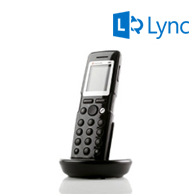
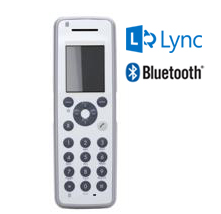
The 84-Series phones are designed with certain industries in mind: healthcare, manufacturing, retail and hospitality to name a few. You can always rely on the SpectraLink 8440, which comes in a black or a blue handset, to keep corridor mobile workers connected while on the job. Previously, your Spectralink 8440 handset would work with most SIP-based call systems as long as you were connecting the handset to the LAN using a Spectralink VIEW certified access point. If you were tech savvy, you may be able to make it work with Microsoft OCS or Lync. Now Spectralink offers specific 8440, 8441, 8452, and 8453 models that are tried and true with Microsoft Lync.

Using the SpectraLink 84-Series WiFi handset with Microsoft Lync brings even greater UC features to your fingertips. When used with Microsoft Lync, the SpectraLink 8440 and SpectraLink 8450 series offers presence, instant messaging, and Microsoft Outlook Calendar integration.

8400 Handsets

The Spectralink base model 8440 handset for Lync comes in either a black or blue keypad face. Unlike the Spectralink 6000 series, the 8400 series handsets will work on any Spectralink VIEW certified WiFi access point. This helps you cut down on infrastructure by using your existing WLAN. The 8440 (and all 8400 series handsets) feature a 2.2in color LCD display with a high 240×320 resolution and four context sensitive soft keys. They offer 2.5mm and Bluetooth headset support and are drop and shock resistant (Do I dare mention MIL STD 810F and IP-64? No, I won’t because that is boring talk, but its all there). When used with the Spectralink desktop speakerphone dock, the Spectralink 8440 also features crystal clear HD voice!

8441 Handsets

The Spectralink 8441 for Lync offers all the awesome features of the 8440 handsets with the addition of security features like “man down” and call alerting. When used with a 3rd party monitoring software, Spectralink 8441 phones can determine if the user is down on the ground, running, or if motion has ceased and notify proper authorities, offering the utmost in workplace safety.

8452 Handsets

The Spectralink 8452 for Lync improves upon the 8440 handsets with the addition of a 1D/2D barcode scanner. Use the Spectralink 8452 with third party software to scan UPC codes or patient identification bracelets. If you are a phone fashionista, the Spectralink 8452 also comes in your choice of blue or black faceplate.

8453 Handsets

Like the Spectralink 8441, the Spectralink 8453 offers security features with the addition of a 1D/2D barcode scanner. The Spectralink 8453 combines the ultimate in versatility and safety, and now it’s updated for Lync.

How to Order

When ordering your new Spectralink WiFi phone, you need to order the handset separately, then choose your battery and charging option. Choose from a single battery and charging cable, a dual charger which charges the phone and a second battery simultaneously, a quad charger which charges 4 batteries, or the 12-bay charger which will cover multiple shift users and is desktop or wall mountable! For the often deskbound professional, Spectralink offers a desktop conference phone charging station which turns your Spectralink handset into an HD Voice speakerphone and charges the battery to boot!

For the complete line of Spectralink covers, clips, and charging devices necessary to make the move to the 84-Series, visit SpectraLink 8440 Accessories and SpectraLink 8450 Accessories.

For more information or if you have any questions, call our VoIP Supply experts at 1.800.398.8647. Let us help you choose the perfect set for your business needs!

Huawei VoIP Switches at VoIP Supply Bring New Networking Hardware Options

October 17, 2013 by Nathan Miloszewski
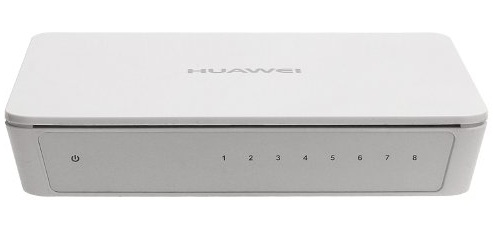
Huawei S1700-8-AC 8 Port Network Switch for SOHO or SMB applications

Huawei S1700-8-AC 8 Port Network Switch for SOHO or SMB applications

Huawei is one of the world’s largest manufacturers of  telecommunications equipment and VoIP Supply is now carrying several series of their VoIP switches:

  • Huawei S1700 Switches for small office/home office (SOHO) applications
  • Huawei S2700 Switches for small and medium-sized businesses (SMB)

Huawei R&D, Good for You and Me

In the United States alone Huawei has 600 employees dedicated to R&D and every year the company invests 20%, or well over $100 million, of its annual revenue to local R&D.

Additionally, Huawei has deployed 800,000 switches with 36 million ports worldwide.

What that means for you is that you get to take advantage of a company that Fast Company named to their Most Innovative Companies List and next-generation switches that are competitively priced loaded with features and flexibility including:

  • Fan-free design
  • Easy operation
  • Energy Efficient Ethernet (EEE)
  • Power over Ethernet (PoE)
  • Quality of Service (QoS)
  • Data security to defend against DoS attacks

“We’re excited to bring on another networking option from Huawei,” said Ben Sayers, VoIP Supply CEO. “Huawei’s commitment to research and development is a big win for our customers looking for switches that are powerful, affordable, and easy to use.”

Adtran: The Next Generation

October 15, 2013 by Taylor Hamp

ADTRAN is a unique company; instead of replacing models, they simply make their existing models better.

ADTRAN’s most recent release is the third generation of the Total Access 900e IP Business Gateways. If you’re not very familiar with ADTRAN, stay tuned; for the people who are familiar with ADTRAN, rest assured all the old Total Access 900e features are still included, and then some.

Adtran TA 900e Series

Total Access 900e IP Business Gateways are known as carrier-class gateways. A traditional service provider such as AT&T or Verizon use TDM switches for their services, and to transform those signals into IP service, you’ll need a gateway with a T1 interface. Here is where ADTRAN comes in. The Total Access line had previously offered a T1 interface, FXS ports, and a single Ethernet interface which gave users IP capability to their existing legacy equipment, along with data connectivity and VoIP functions such as Voice Quality Monitoring and Quality of Service. ADTRAN also integrated a full featured IP router which provided the gateways with this data routing and Internet connectivity. Users could expect the gateway to perform stateful inspection firewall for security and have dynamic bandwidth allocation.

Now take all those features and add-on these:

  • 66% performance increase in router performance
  • Better enabled bandwidth for faster services at 100 Mbps
  • Multiple T1 interfaces: Quad T1/FT1 and RJ-48C and USB 2.0
  • 3 Ethernet interfaces: 1 Gigabit and 2 Fast
  • Hardware-based Network Address Translation (NAT) for IP address concealment and security
  • Supports 802.1q Virtual LAN (VLan) Trunking
  • Optional Enterprise Session Border Control (eSBC) with an additional upgrade
  • Optional outbound FXO lifeline for improved flexibility with hardware configuration

These are just a few of the dozens upon dozens of features of the Total Access 900e Gen 3 IP Business Gateways. Chris Thompson, director of product management for ADTRAN, stated in their press release: “As carrier experts continue to choose ADTRAN for their network, we have raised the bar on the performance and features of the Total Access 900e to address new applications and capabilities needed to take high-performance networks to the next level.”

ADTRAN does it right by maintaining a good product and updating the line when it’s beneficial to the customer. In a world of changing technology, it’s key to have a device that can manage the transition from aged-out analog equipment to VoIP hardware. The Total Access 900e Series can keep your fax machine running while supporting VoIP phones smoothly. If you’re looking for flexibility and scalability, Adtran might be the perfect route for you.

Calling All Entrepreneurs to Startup Weekend Buffalo – October 4th to 6th

September 30, 2013 by Nathan Miloszewski

If you want a crash course in entrepreneurship then Startup Weekend Buffalo, running October 4th to the 6th,  is for you.

And if even if you don’t have an idea for a business but you still want to get involved, that’s great too because this event is all-inclusive.  You can use your experience to help someone else’s vision become a reality.

Registration costs $50 per person ($25 for students) with meals included and are available for three types of participants:

  • Developer: Software engineers, coders, developers -anybody who can write code.
  • Designer: Anybody with a  background in design (graphics, UX/UI, etc.).
  • Non-Technical: Business, marketing, PR, and anyone with a non-technical background.

About and Prizes

Click here for more details on exactly what Startup Weekend is or, as their homepage explains:

Whether entrepreneurs found companies, find a cofounder, meet someone new, or learn a skill far outside their usual 9-to-5, everyone is guaranteed to leave the event better prepared to navigate the chaotic but fun world of startups.

This is only the third ever Startup Weekend in Buffalo and its popularity has already outgrown its original meeting space at Medaille College and is now being hosted on the UB North Campus at Davis Hall.

Instead of a cash award,  prize packages will be awarded to first, second, and third place finishers that include a range of web, financial, legal, marketing, and business development services.

Panoramic Polycom CX5100 Video Conferencing Station Optimized for Microsoft Lync

September 24, 2013 by Nathan Miloszewski
Lync Conferencers of the Roundtable

Lync Conferencers of the Roundtable

Very soon the Microsoft Lync Optimized Polycom CX5100 Unified Conference Station will be available at VoIP Supply.

We’re expecting to see these by the end of September 2013.

Unveiled at the 2013 Microsoft Worldwide Partner Conference, the CX5100 is for Microsoft Lync users collaborating with remote teams.

What they’ll get is a unique 360 degree, panoramic video experience that also displays a seamless dual window layout.

The “Roundtable”

The CX5100 was originally called the “Roundtable” because the device is placed in the center of a meeting room table and uses a handful of cameras that stitch together a panoramic view that is displayed in one window while another window displays a zoomed in image of the person who is currently talking.

Polycom uses what they call “Active Speaker Detection” which is a feature that alerts the cameras to automatically focus on, and switch the image to, the person that is actively speaking.

Who Wants to be Single?

A single camera limits what you see and do during a video conferencing call.

The multiple cameras of the CX5100 follow the speaker wherever they go so that they can move freely around the meeting to draw on a whiteboard or demonstrate how a product works.

In other words, all the things that you normally do in a collaborative seeting will be captured by the CX5100 which will produce an intuitive and naturally flowing conversation experience.

The CX5100 is the successor to the Polycom CX5000, which has the same engaging 360 degree view, but also offers:

Lync Optimized Polycom CX5100

Lync Optimized Polycom CX5100

  • More than twice the HD video image quality
  • Double the frame rate for life-like motion handling
  • Polycom HD Voice audio quality
  • 1080p with Microsoft Lync 2013
  • 720p backwards compatibility with Microsoft Lync 2010

The all-new user interface and system design makes the CX5100 easy to launch or join a call directly from the Lync user environment by simply connecting the CX5100 via USB to a computer that is running Lync.

“Polycom is the benchmark for reliable video conferencing,” said VoIP Supply CEO, Ben Sayers. “Microsoft Lync Unified Communications has been greatly enhanced with the USB plug and play Polycom CX5100 that offers an outstanding HD panoramic video conferencing experience with cameras that automatically follow you around the room.”

Watch this video to learn more:

Tips on How to Start a Business from VoIP Supply CEO Ben Sayers

September 23, 2013 by Nathan Miloszewski

Have you ever wondered how Ben Sayers, CEO and owner of VoIP Supply, started the company?

Find out here in Jaime Tardy’s interview at Eventual Millionaire, Step by Step Starting a Business with Benjamin Sayers, plus the strategies and techniques he uses including:

  • Using checklists
  • Competitive intelligence
  • Creating business plans
  • Setting goals

VoIP Supply is now in its 11th year of business and now Ben is starting a new venture. Click the video above to learn more.

Free Site Survey with Purchase of New VoIP System

September 6, 2013 by Nathan Miloszewski

Do you know about Deploy, our nationwide VoIP installation services?

If your business doesn’t want to deal with the nuances (to put it nicely) of installing a new VoIP system, Deploy is a fast and painless way to have somebody (Us!) do it for you.

Custom Fit

Get an on-site analysis by a trained technician who will tour your building, inspect your current network, and give you options on the VoIP hardware that’s best for your application.

Then we’ll install a customized VoIP system for your current needs and, if you choose, one that can be expanded as your business grows.

Purchase Credit

A lot of VoIP deployments fail because the network being used isn’t powerful enough to handle the additional traffic.

The Deploy Site Survey makes recommendations based on findings from inspecting and testing the existing network and as an added bonus, the cost of this service is credited towards any VoIP system purchased through VoIP Supply.

3 Key Services

We offer three key Deploy services to get your phones up and running:

  • Network Installation: A solid network infrastructure is the backbone of a reliable VoIP System. Deploy Network Installation Services will configure and install server racks, network switches, and routers for trouble free VoIP calling.
  • Cabling Installation: Running Ethernet cable is almost as much fun as watching paint dry. For those that don’t have the time for that, the Deploy Cabling Installation Service will supply, install, terminate, test, and label a new Cat5e cable run.
  • VoIP Installation: Deploy VoIP Installation Services provide a certified VoIP Supply field technician to configure and install a VoIP PBX and its phones to the customers exact specifications.

“Every VoIP installation is different,” said VoIP Supply CEO Ben Sayers. “Businesses can use VoIP Supply’s Deploy services to take the hassle and confusion out of setting up any part of a new or expanded VoIP system.”

VoIP Supply Offers Rush Processing Option for Same-Day Shipping

August 28, 2013 by Nathan Miloszewski

When next day shipping isn’t fasn’t enough, VoIP Supply now offers Rush Processing for VoIP, Video Conferencing, IP Surveillance, and Unified Communication devices.

When you’re checking out online, all you need to do is check the “Need your order faster?” box or, if you’re on the phone with your account manager, just ask them for “Rush Processing.”

Here’s how it works — VoIP Supply will speed up shipment:

  • On all orders placed before 3:30pm EST
  • For a small, additional fee
  • When the billing and shipping address are the same.

VoIP Supply always puts forth its best efforts, but unfortunately cannot guarantee that orders will ship the same day.

Patience is annoying but sometimes necessary, so in the event a rush order fails to ship on the same day, the Rush Processing fee is refunded.

Axis Naming Convention

August 23, 2013 by Taylor Hamp

Axis is probably one of the most well known names in IP surveillance. They were the first on the scene completely dedicated to video over Internet Protocol back in the late 90’s and are still industry leaders today. Like all manufacturers, they have a naming matrix that might not make sense at first, but it’s pretty easy to decipher.

Axis created their own naming convention chart (image below) to educate their buyers of the cameras for at-a-glance understanding.

th_product_name_convention_large

In this example, the P3367-VE breaks down into meaning it’s meant for a versatile and secure advanced video solution, it’s a fixed dome camera, P33 series, supports 5 or more Megapixels, housed in a vandal resistant outdoor enclosure.

ph_p72_right_white_low

Using another example such as the P7224, it would imply it’s a versatile and secure advanced video solution, video encoder/decoder (in this case, it’s an encoder), P72 series, and it can support up to HDTV resolution.

ph_t8414_right_1201_low

A final example would be the T8414: This comes from a range of accessories that increase the benefits of network video, it’s a system product, T84 series, and it will display in up to HDTV resolution.

For more information on Axis IP Cameras and their accessories, check out the support documents Axis offers on their website at http://www.axis.com/techsup/index.htm.

Are You a Headset Hoarder? Help is Available

This is my desk. There are many like it, but this one is mine. . .and boy is it a bit of a mess.

I am a Headset Hoarder

So why am I reciting a variation of the Rifleman’s Creed and showing a cluttered photo of my desk?

Partially to publicly shame myself into taking some action and clean it up but also to talk about a small problem I have that is shown in the photo, that I can now admit to openly and take steps to conquer.

I am not talking about the layer of dust over everything that rivals a mid-winter snow storm, the fact it is one of the last Fridays in the summer and I’m at work, or the two phones on my desk but, the pile of four headsets on my desk.

I am a Headset Hoarder

It feels good to finally be able to say it and start my path to recovery.

Recognizing My Headset Hoarding

For the record the four headsets shown are the VXi UC ProSet Lux, Sennheiser SC 260, Sennheiser SC 230 and Jabra Chill. In addition to those outside of the photo I also have a new VXi V150 which I am going to be testing next week, a Jabra SPEAK 410, a Plantronics Voyager Legend and a pair of Sennheiser CX310 headphones. As I said, I am a Headset Hoarder on the cusp of being featured on a headsets episode of Hoarders.

On their own each of these headsets are very good and do a great job. From the use and abuse I’ve put them through I have nothing but praise for them and would recommend each of them when used in the right situation.

The problem I have run into which has led to my hoarding, is each one can only be used for one or two specific tasks.

These tasks can be one or two of the activities I do on a daily basis which include calls on either of my desk phones, calls and webinars on my PC, making calls on my cellphone and listening to music on my iPod.

This slight limitation on the uses has resulted in in my need for all of my headsets.

The Solution to My Headset Hoarding

The solution to my headset hoarding is to switch to a single headset that will allow me to connect to my desk phone, my PC, my iPod and my cellphone.

Jabra PRO 9465 and Plantronics Savi W720

This solution looks like it will come in the shape of one of two headsets, the Jabra PRO 9465 Duo or Plantronics Savi W720. With either of these headsets I will be able to replace the majority of the headsets on my desk with just one thanks to the triple connectivity capabilities that they both support which will allow me to:

    • Connect to my desk phone with support for Electronic Hook Switch or a lifter for remotely answering a call
    • USB connectivity to connect it to a computer for webinars and softphone applications
    • Bluetooth connectivity for my cell phone and my iPod.

An added bonus of switching to one of these headsets is I will have add wireless mobility to allow me to get up and move around without worrying about missing a call. This is a feature that is not available to me with any of the headsets I currently use.

Since I listen to music throughout the day in each example I have chosen the binaural or stereo versions but within the Plantronics Savi series and the Jabra PRO 9400 series there are monaural or single ear versions. Additionally Jabra, Plantronics, Sennheiser and VXI carry headsets that will connect to just your desk phone and your PC if you don’t need the Bluetooth connectivity.

There it is, I’ve finally been able to admit to it, I am a headset hoarder but one that is taking steps to curve my affliction. Of course that is if my desk isn’t consumed by the dust first.

  • Featured Posts

  • Popular Posts

  • Read Our Feed

  • Latest

  • VoIP Post Categories

  • Archives