It’s safe to say that Grandstream has become a very popular name in the VoIP community and their catalog of products continues to grow. Grandstream is continually releasing new products like PBX’s, IP phones, gateways, door cameras and even cordless VoIP phones!
If your business is already using Grandstream products, and you have an office that is always on the go, then you are going to want to watch this video!
Having this application on your Apple or Android device allows you to take your desk phone with you wherever you go! It’s easy to use and packed with features!
Our senior VoIP expert Brian Hyrek took some time out of his day to sit down in the lab and play around with the Grandstream Wave and he had nothing but great things to say! Most notably, Brian was impressed with how easy the application was to use!
So, if you are already setup and using a Grandstream PBX, then take a look at this review video for a quick overview of its user interface and functionality!
Do you already use the Grandstream Wave? Or do you prefer a different softphone application? Let us know in the comments!
Microsoft Corporation announced that they will release a free version of Microsoft Teams to compete with Slack, a free app pioneer that allows users to try before upgrading them to a paid version.
This free version of Teams is intent to attract small firms and groups of coworkers who don’t want to pay for the commercial Office 365 subscriptions, at least initially.
What does the free version of Microsoft Teams offer?
The free version is available in 40 languages and it supports up to 300 users, unlimited chat messages and search capabilities with 10GB of team file storage plus 2GB per person for personal storage.
Once the free version of Teams upgrades to paid Office 365 plans, users will get more storage and access to more of Microsoft’s cloud-based apps.
The free version also offers:
Built-in audio and video conferencing for individuals, groups, and full teams
Integrated Word, Excel, PowerPoint, and OneNote apps
Unlimited integrations with more than 140 business apps such as Evernote and Trello
Is Microsoft Teams free version for my business?
The free version of Microsoft Teams certainly is appealing, but you would want to make sure that the free version is enough for your business!
Remember, there are other VoIP service options that don’t cost that much but will ensure you have all the functionalities your business needs. Contact our VoIP experts at 1-800-398-8647 for a free consultation today to discuss further!
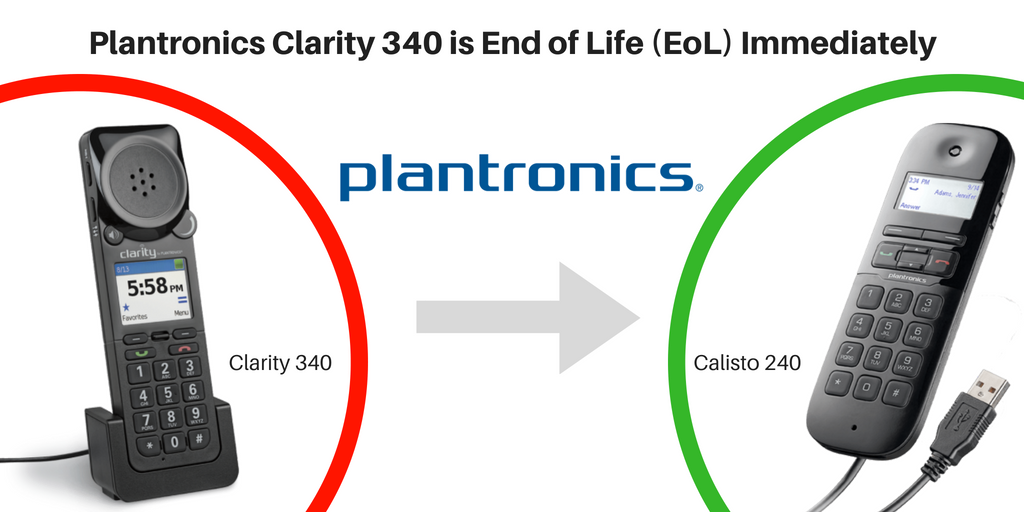
Plantronics today announced that their Clarity 340 handset is going end of life effective immediately. This UC handset is ideal for enterprise workers who face collaboration issues due to hearing, vision, or dexterity challenges. For non-headset users, the Clarity 340 utilizes the power of PC communications and allows users who are specifically focused on making phone calls to connect via USB for the ultimate softphone solution.
Amplified 40dB audio with DCP digital sound processing
Built-in, full duplex speakerphone for high-quality audio with hands-free convenience
Easy to read color display screen
Standard 12-key telephone dial pad with a mute button
If you are interested in the Clarity 340, call our VoIP consultants at 1-800-398-8647 for pricing and availability!
What’s the replacement for the Clarity 340
For those who are searching for a replacement, we recommend the Calisto 240, a portable USB handset for PC communications. This device has wideband audio and a noise-canceling microphone in a familiar handset design.
LCD screen for easy call ID viewing and menu navigation
Wideband and noise-canceling microphone offer the best PC audio available
Built-in, full duplex personal speakerphone
SoundGuard provides protection against audio spikes
Broadvoice, an award-winning provider of hosted voice, unified communications (UC) and SIP Trunking services for businesses, announced that Broadvoice b-hive has been awarded a 2018 Unified Communications Product of the Year!
“It gives me great pleasure to honor Broadvoice as a 2018 recipient of TMC’s Unified Communications Product of the Year Award for its innovative product, Broadvoice b-hive,” said Rich Tehrani, CEO, TMC. “Our judges were very impressed with the ingenuity and excellence displayed by Broadvoice and its groundbreaking work on the b-hive solution.”
Broadvoice b-hive is a Unified-Communications-as-a-Service (UCaaS) and virtual contact center platform, which delivers cloud communications capabilities to small and medium businesses. This unique UC solution brings together powerful cloud PBX, UC and collaboration features with the virtual contact center in one platform that’s connected to Broadvoice’s secure, redundant network and hosting infrastructure.
Congratulations Broadvoice, we are very excited about this great news! If you’d like to learn more about Broadvoice solutions, visit Broadvice’s page or contact our VoIP experts at 1-800-398-8647 today!
Communication is at the heart of patient-centered health care. Without a dedicated communication system, many hospitals and clinics struggle to provide the best care possible to their patients effectively. That’s where Spectralink Clinical Devices come into play!
Spectralink’s WiFi phones have helped many healthcare providers like yours solve communication challenges. Here are three of the most common ones that we address:
Top 3 Healthcare Communication Challenges and Solutions
Challenge 1: Retrieving patient records is a time-consuming process
Having patient records and current information at their fingertips enables clinicians to spend more time with their patients. Spectralink’s PIVOT WiFi phone gives clinicians like you immediate access to patient records so that you can offer the best care possible and save valuable time to treat your patients right! A faster response will also improve patient satisfaction.
Challenge 2: Personal smartphone use increases potential security risks
Your personal smartphone comes in handy to access the web or exchange text messages, but it also brings a lot of security issues in a healthcare work environment! With the PIVOT Series WiFi devices, you enjoy the same freedom to roam in the clinic like you could with your personal phone, except that it’s much safer. You can eliminate potential security risks and communicate with ease. Plus, the PIVOT WiFi phones support leading healthcare apps and come with clinical alerts and alarms, so you won’t miss anything important!
Challenge 3: Lack of efficient team coordination
Team coordination can be quite challenging when helping your patients navigate through the healthcare system. Spectralink’s PIVOT devices provide your dispersed care teams better coordination and clinical resource utilization with real-time video and secure text messaging. This helps to effectively communicate a patient’s need or situation and reduce the risk of communication errors!
More Unique Features from Spectralink PIVOT Series:
Our tech support team at VoIP Supply offers great pre- and post-sales support plus provisioning, consultations, configuration, and installation help. We get a lot of VoIP hardware and software questions and would like to share the solutions with everyone.
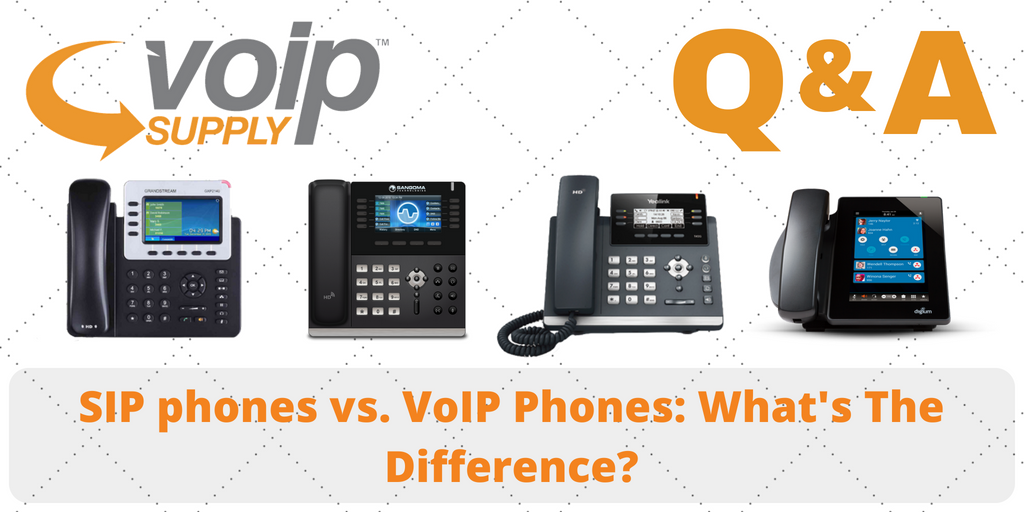
What’s the Difference Between SIP phones and VoIP phones?
Q:I am not very familiar with SIP phones vs VOIP phones. Is VoIP phone designed to work independently, or as a handset for a softphone? Could a VoIP phone work autonomously without the need for direct connection to a computer?
Unfortunately, the issue we are experiencing with our currentPolycom phones is that they are basically too intelligent! Our staff daily even sometimes hours switch stations. and currently, they are having to re-verify credentials when they log into a new station so they can pair with the associated phone
A: SIP and VoIP are synonymous to a degree. All SIP is VoIP but not all VoIP is SIP. SIP is a particular protocol. There are more protocols that are VoIP. Skype for Business is a prime example. Skype is not SIP, that is why we specify a device for Skype for Business.
Yes, for sure! A workstation computer does not control the call, the PBX does.
STAY TUNED
Come back for more VoIP questions and answers next time! If you have VoIP questions to ask us, please submit a technical support ticket or contact our VoIP experts today at (866) 582-8591
We are featured in the Telecom Reseller Podcast again! This month, our Channel Manager, Don Stefanie, talks about how VoIP Supply offers provisioning services that saves VARs, service providers and customers time and money. Listen to the podcast and learn more about the VoIP Supply’s provisioning service now!
VoIP Supply’s provisioning service includes PBX provisioning, system configuration, PCI card configuration, wireless access point configuration and installation, and much more! Here are just some of the benefits you can enjoy from provisioning with the VoIP Supply team:
Prevent out of the box failure and major customer disappointments with comprehensive tests
Offer better and more successful installations to be competitive – just like other bigger players
Save your valuable time and money to focus on growing your core business
Back in late March this year, Plantronics announced the acquisition of Polycom, a multinational VoIP provider for video, voice, and content communication collaboration. Today, Plantronics finally completed this 2 billion acquisition deal, with approximately $1.6 billion in cash and 6.35 million Plantronics shares.
The combined company offers integrated solutions including headsets, software, desk phones, video and audio conferencing solutions and more.
We are thrilled to hear this news and looking forward to seeing how this partnership will benefit more VoIP users! Learn more about Polycom and Plantronics here.
We all love shopping online! According to BigCommerce, 95% of Americans shop online at least yearly. Where else can you shop at midnight, without waiting in a line or even in your pajamas?
However, as the number of online stores continues to grow, so does the number of bad shopping experiences, especially for tech products like VoIP hardware! Therefore, today, we are going to share some useful tips that will help you avoid bad VoIP shopping experiences:
VoIP Hardware Shopping Checklist
#1 Brand New vs Refurbished
Are you looking to purchase a brand new VoIP phone or a refurbished one? The prices can be very different! If you decided to go with the refurbished equipment, there are a few things you would want to consider, including the device condition, default settings, and more. Read our blog to learn more: Refurbished Phone Checklist: 5 Factors to Consider
#2 Warranty
Check with the seller to see if they provide warranty for the equipment you are interested in buying. The warranty can really come in handy and save you a lot of trouble and money when your hardware doesn’t work the way you expected!
“We receive many questions about troubleshooting VoIP hardware that was purchased from some random website. One piece of advice that I would give is, don’t just make a purchase because it’s the cheapest price, this could be a costly mistake for your business. If that equipment isn’t provisioned properly and you don’t have support, you could be looking at thousands of dollars lost as well has hundreds spent on support.”– Mary Cheney, Marketing Supervisor at VoIP Supply
#3 Provisioning & Tech Support
If you are not a technician and don’t know much about VoIP, make sure your provider or the website you purchase from offers tech support! There are many VoIP providers and website out there that only sell you the devices solely but don’t install, provision, or assist you when you encounter any technical issues.
#4 Hidden Cost
Are you looking at the total price? Is there something you have to pay separately in order to make your equipment function correctly? Some providers and websites sell the pieces or service separately so they can attract you with a lower price but then after you may be asked to pay extra fees to make it work.
The bottom line is – don’t just buy VoIP hardware from any website! Chances are they won’t work. Buy from an accredited VoIP company like VoIP Supply to ensure the best VoIP shopping experience! How’s your VoIP shopping experience? Share with us!
Editor’s Note: This article was originally posted in October 2015 and has been fully updated for accuracy and comprehensiveness in June 2018.
If you are researching into deploying a VoIP Telephony System on your own for the first time, you are probably seeing FXS and FXO acronyms all over the place. When you’re new to VoIP learning it can be very difficult. Hopefully, we can help to make a little sense of FXS/FXO for you.
What is an FXS port?
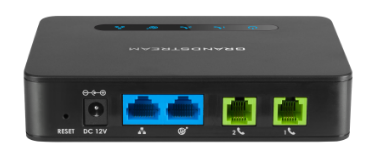
FXS stands for foreign exchange subscriber. An FXS port is an interface that connects station devices such as your phones or PBX to a VoIP adapter.
FXS is an RJ11 port that connects internally to an analog office phone or fax machine. Think of the S as meaning a station or a cubicle. Any FXS port is going to connect to an analog DEVICE and the cable from the port to the device will never leave the building.
Now, on to the FXO ports…
What is an FXO port?
FXO stands for foreign exchange office. An FXO port is an interface that connects your Plain Old Telephone Service (POTS) line to a VoIP adapter.
It designates a telephone signaling interface that receives POTS (plain old telephone service). Um… ok. Let’s put it this way, FXO is a port that will connect a device to an outside telephone line. Think “O” for “Outside”. Picture an RJ11 wall jack that connects to a box in your basement which is connected to the line from your house to the nearest telephone pole on your street. Any RJ11 port on a device that is headed towards that wall jack is an FXO port. It connects your device to the “outside” world or your local area telephone “office”.
What is an FXO/FXS port used for?
These ports are used to allow you to connect your analog phones to a VoIP system. An FXS port helps you connect your analog fax machine to your VoIP phone system; an FXO port enables you to use analog telephone lines with your VoIP phone system.
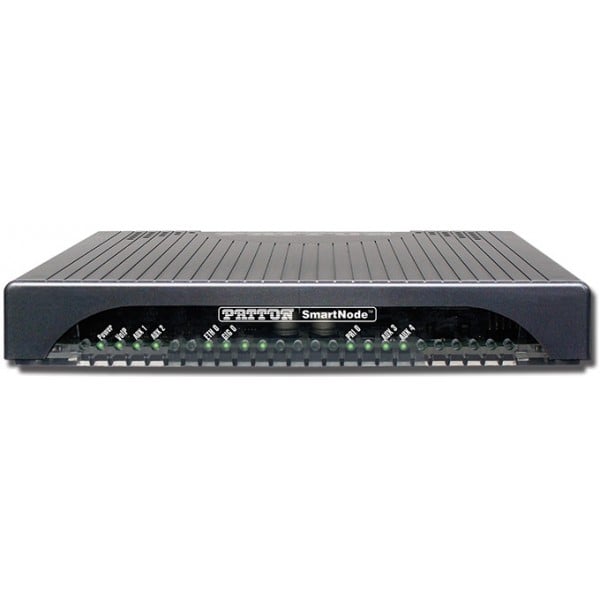
An FXO/FXS VoIP Adapter and Gateway
FXS and FXO ports are important when dealing with VoIP adapters and VoIP Gateways. The number of telephones, PBX systems or PSTN lines you are looking to connect to a VoIP adapter or gateway determines how many of each port you will need.
An FXS gateway is used to connect your traditional telephones and fax machines to a VoIP Phone system; an FXO gateway is used to connect your VoIP phone system to your PSTN lines.
VoIP Failover
In the event of failure, the most critical phone systems should have a failover feature so phone calls or faxes may continue during the downtime. You can still make telephone calls via the POTS line. Also, you can use the FXO port to make free local calls on your PSTN line.

 It’s safe to say that Grandstream has become a very popular name in the VoIP community and their catalog of products continues to grow. Grandstream is continually releasing new products like PBX’s, IP phones, gateways, door cameras and even cordless VoIP phones!
 Microsoft Corporation announced that they will release a free version of


 Broadvoice b-hive is a Unified-Communications-as-a-Service (UCaaS) and virtual contact center platform, which delivers cloud communications capabilities to small and medium businesses. This unique UC solution brings together powerful cloud PBX, UC and collaboration features with the virtual contact center in one platform that’s connected to Broadvoice’s secure, redundant network and hosting infrastructure.





 However, as the number of online stores continues to grow, so does the number of bad shopping experiences, especially for tech products like VoIP hardware! Therefore, today, we are going to share some useful tips that will help you avoid bad VoIP shopping experiences:
 FXO stands for foreign exchange office. An FXO port is an interface that connects your Plain Old Telephone Service (POTS) line to a VoIP adapter.
 FXS and FXO ports are important when dealing with
  An FXS gateway is used to connect your traditional telephones and fax machines to a VoIP Phone system; an FXO gateway is used to connect your VoIP phone system to your PSTN lines.
